Sep 09 2009

Nancy White interview

Published by under History

Here’s an 8-minute interview with Nancy White, where I ask her several questions about what’s important about the book, how it came to be, and what’s left out.  You can tell that I’ve edited out about 10 minutes of discussion.  This could have been a very long conversation since we both feel the topic is important and we both have learned how to get the other person to dig into their experience.  But I wanted to do a short interview, so I chopped out most of what I said.

Nancy White and I go way back, since Margaret McIntyre said I should look her up and I volunteered to help at a conference in exchange for bunking on the White House floor almost 10 years ago.  We’d worked on many projects together by the time the book project got going.  Of course there’s nothing like working on a book for five and a half years together to really make friends…

Technology stewardship is something that people are doing whether it’s cool or not.  Talking about the book in this way reminds me that it’s very important that our thinking came from actual practice.  We were practitioners first, authors and “students of technology stewardship” later.  So talking about the book like this tends to naturally look back at the past and look forward toward the future.  As a result there are many things we want to know about the future of our practice and the future of yours.  Where does the book lead you?

3 responses so far

Aug 28 2009

Making webinar software more open

I’ve always found webinar software like WebEx, Elluminate, or GoToMeeting to be constraining and, because they try to be a “total solution” they don’t play well with other uses or software. Because they’re popular they’re used in situations where they’re inappropriate. The Digital Habitats wiki, for example, doesn’t go into enough detail about their uses in community settings.

Yesterday I noticed an interesting webinar format that solves one of the persistent boundary and participation problems that I see with this kind of software. Intronetworks held a webinar on “community management as a job.” I was late to the presentation, so when the GoToMeeting screen first came up, the first thing that caught my eye was that Twitter IDs were used to identify the speakers:

Intronetwork speakers

Like many such webinars, the audio channel was really the main thing. But I realized that a twitter stream with the hashtag “introchat” was the main visual. There were some slides, but visually the audience was asking questions, making comments, inviting others into the session. In the course of an hour there were almost 500 tweets. Huge audience participation relative to what the sages on the stage were offering.

It felt like the beginning of a community of practice of community managers. At least a drop-in jam session of one.

Two years ago I wrote about the Intronetworks software and was kind of critical about the hard boundaries between “inside” and “outside” their application here and here. (That may be because people want those boundaries, however.) Interesting to see them innovate by using webinar software in such an open way.

(Cross-posted from my blog on LearningAlliances.)

5 responses so far

Aug 13 2009

About this blog

Published by under Overview

Welcome to our website and blog: it complements our book, Digital Habitats: stewarding technology for community. Get in touch with us, find out more about the book, about us authors, and get excerpts and additional material that complement the book. You can buy the book here.

No responses yet

Aug 12 2009

Personal tech configuration as steward’s springboard

(Crossposted from Nancy’s blog)

intersections and configurationsRecently I wrote a post on my blog that received a lot of attention – more than I would have expected: How I use social media. At the end of the post, I promised to write about WHAT social media I currently use.

I  think of the constellation of tools a person uses as their configuration of tools. It is both what they use, how they use them, and how they fill the range of needs as a whole. I have saved a few delicious tags about individuals’ technology configurations if you want to browse with they use.

As I was tracking down all my tools I had this little “aha” moment about technology stewardship. By looking at one’s personal technology configuration, you can get a sense of what a community’s tech configuration might be.  It is sort of a microcosm.

So here it goes…

I started making a list of all the social media I use. I realized there is an important distinction between the media I use regularly, and the media I try, dabble and experiment with. Part of my work requires me to do a lot of experimentation, so I have accounts on scores of social media sites – more that are forgotten than are used. So I want to focus on the tools I use regularly, the tools that make a difference in my work. Now some of you may say a few of these don’t qualify as “social media” – old school things like email. I’m including them because I think social media predates the label. 😉

I also wondered if it would be worth organizing them in the categories of “use” I used in the previous post. This would clearly create duplicates, so I resisted that impulse. It would have created too much duplication if I tried to sort them into:

  • Learning
  • Getting work done
  • Finding and connecting with people
  • Getting stuff (search, content, etc.)
  • Exploring and pushing my own boundaries

So here are the tools.

  • Email
    • Eudora (business, family and close friends) – Eudora was my first email program and you know how it is, you get used to something. Eudora is no longer a paid product, now Open Source. I am not an Outlook fan. What can I say?
    • Gmail (two accounts, one to back up my Fullcirc email and one for everything I don’t want in my main in box.) I considered moving all my email to Gmail but decided I don’t want all my eggs in one basket. However, most of my email lists and social media accounts use Gmail so I can keep my other inbox manageable. This has made a BIG difference in the efficiency and effectiveness of my email practice.
    • I still have a Yahoo mail account and perhaps a hotmail account… who knows?
    • Old fashioned web access from my ISP for when nothing else works (always have a back up) – When you depend on email and the internet, you want more than one way in. I also still have a dialup service I can use on a per minute basis but knock on wood, I have not used it in years.
  • Browsers
    • Firefox – my day to day browser, but I have weeks where I trip on over to Chrome. I haven’t opened up IE in months.
    • Chrome – because I can…
  • Blogging
    • Word Press plus plugins – A friend (thanks Jon!) helped me set this up and I have been very very happy.
    • (I used to use Blogger). I left Blogger unhappy. I hosted my own blog and had mountains of FTP problems, and from the forums, I was not alone. Never got a stitch of help from Blogger. That was the end of what once was a happy relationship.
  • Microblogging
    • Twitter – I want to look into Laconi.ca because I’m getting more and more convinced that decentralized apps are the way to go if you want resiliance.
    • Twhirl as a Twitter desktop client because I find Twitter on the web tiresome.
    • Tweetdeck when juggling Tweets at events, hashtags. Otherwise it is too much and it hogs a lot of resources on my older desktop computer.
  • IM and VoIP
    • Skype (chat function might be listed as a tool unto itself. I’ve abandoned MSN and AOLIM.) What would I do without Skype? I work with people all over the world. The free VoIP, the presence indicators, the chat, file transfer, etc. –> central application for me, second only to email.
    • VOIP phone service with a web interface provided by my ISP. I can pick up my voicemail via the net or via email, transfer calls away from home etc. I also get unlimited long distance in North America and certain European cities, but I still use Skype.
    • HighDef Conferencing (paid service) for large audio meetings because it scales well and allows entry by both Skype and telephone and has some local numbers in other countries. I have global networks and groups!
  • Chat
    • Skype
    • Etherpad but I sure wish you could have more than 8 people on at a time or that they had a paid hosted service. It is a sweet combo of real time wiki and chat room that pairs great with a Skype call or telecon.
    • IRC (yeah, still IRC!)
    • Google Talk sometimes
  • Co-writing & Publishing
    • Google Docs has become my primary shared writing and spread sheet space. I need to try Zoho ! (See here for more alternatives. I don’t know about you, but I get worried when I rely too much on one company. So much for integration, eh?)
    • Wikispaces and other wikis, including MediaWiki. I am a wikispaces fan girl for sure! Easy to use. I also like PB wiki, now called PB Works
    • Etherpad (also for chat during audio calls)
  • Live meeting tools (Often I don’t have a say in what is used.)
    • Elluminate – a paid service, but worth it when there is budget. You can get a free 3 person room to try it out. I like it because you can devolve controls way out to participants and have multiple moderators. WebEx and Live Meeting— take note! I am floored the MS Livemeeting does not have integrated participant chat. You can only chat with the moderators. I am not into top down controlled online meetings, thanyouverymuch!
    • Dim Dim (I’ve only used the free version)
    • Vyew – free, visually a bit messy, but works well for small groups.
    • Adobe Connect – quite a few of my clients use this, especially in the academic realm. I’ve never managed it, but it was a pleasant experience using it.
  • Images
    • Flickr (including third party Flickr toys) – I love flickr. I love the ease of posting my pics, of finding creative commons pictures to use from other Flickrites and the general sense of camaraderie that emerges around images. Damn cool!
    • Picassa and Picassa web albums – I manage and edit photos with the desktop application and then use Picassa when I want to easily, more privately share pictures. I use this a lot with my clients.
    • Picnik and Snagit (hm, where does the line between software application and social media sit?) for capture and editing.
  • Aggregating
    Because I don’t want to use just one integrated set of tools and because setting content free and making it useful to others are two core practices of mine, tools that make it easy to syndicate and aggregate are essential. Even if I never fully understand how they work! These all leverage RSS.

    • Bloglines
      – where I subscribe to and read blogs. Alas, I’m spending less time reading. Where does the time go?
    • iGoogle – nice as a start page, especially for when I’m on the road.
    • Netvibes – another nice start page tool that I am using less since iGoogle. I’m fickle.
    • Feedburner – to help manage the feeds FROM my blog.
  • Conversational, content management and “Learning” platforms
    This is a very messy lump from a technology standpoint. It used to be that online events and work spaces were very tidily held within one application. Then these tools were stand alone and indispensable. Now it seems I use part of them – the part that works well – and I often ignore the rest. For example, WebCrossing has a fabulous email interface for when I need web based discussions that can be used offline for low bandwidth settings. The rest I can ignore. Moodle, while pretty visually ugly, is easy to set up and is fabulously open source, as is Drupal. And despite rumors to the contrary, email lists are alive and well and in fact critical in low bandwidth settings.

    • Moodle – open source “learning management system” but I use it simply as a collaboration space. Please, someone tell them to improve their blog structure!
    • Webcrossing – known fondly by some of us oldtimers as the cockroach of online conferencing as it just doesn’t die.
    • Drupal – powerful open source content management system. Know what you are getting into and it can do a lot, or use specific pre-configured packages such as the Social Media Classroom.
    • Yahoogroups – oldie but a gooie.
    • Googlegroups
      – my more technical groups prefer this over Yahoogroups and I can’t seem to figure out why, but it is consistent feedback.
  • Bookmarking
    I am a bookmarking addict and to be frank, I’m not sure why. I think I’m afraid I’m going to miss or forget something, but truth be told, I don’t use my bookmarks once I’ve created them!

    • Delicious
    • Diigo – I particularly like that you can bookmark on Diigo and set it to automatically add the bookmark to delicious. However, I use it less because it appears to be down more than delicious.
  • Video
    I don’t use video much – nor as much as I might like to. I get content on Youtube but prefer posting on Blip.

  • Music
  • Filesharing
  • Social Network Sites
    • Ning – not so much that I would choose it, but many of the groups and networks I belong to have chosen it. I specifically dislike the content-empty email alerts. You have to click in, sign in and then find out the message wasn’t of interest. Ick. Also, there should be more ability to link between Ning communities, IMHO.
    • Facebook – more because many people in my life use it centrally and if I want to be connected to them, I have to play the game. Otherwise I would probably avoid it.
    • LinkedIn – I use it again because peers I care about do. I think I’m pretty well linked in already! 🙂
  • Mindmapping
  • Other Stuff
    • Carbonite back up (I include it because I learned about it from my network!AVG Anti virus would fall into the same bucket. I have both a local and online backup. Yup, back it up friends, back it UP! If
    • TinyUrl.com
    • Google translate (used to use Babelfish)
    • Wordle because it is visually fun and easy to make tag clouds. It is a lazy way of making discussion summaries as well. Shhhh… don’t tell!

What is YOUR configuration? If you are a technology steward for a community, how does your personal configuration inform the configuration of the community?

16 responses so far

Jul 29 2009

The Book is Almost a Reality (so lots to do!)

Published by under History

To what extent do participants in joint activi...
Image via Wikipedia

The manuscript is at our printer, Lightingsource. The cover is done. The index is done. We await the proofs, knowing full well there will be errors and typos, despite the best effort of us and our friends who have been helping out. But Digital Habitats is about to emerge. The tentative date is August 15, 2009.

What we now realized as self-publishers is that there is still so much to do. Get this site cleaned up and visually congruent with the book cover. Add important information like how to contact us, our upcoming speaking and workshop schedules in case anyone wants to piggy back a book event. All the great pre-release reviews that have been done and collected. ‘

These transformations will be done live here on the book blog, so check back, subscribe and by all means, kibbutz, make suggestions etc. After all, this IS about community!

Reblog this post [with Zemanta]

3 responses so far

Jun 25 2009

Pumping our own gas (as fast as we can)

Published by under History,Stories

Pumping your own gasFor a couple of years it wasn’t “a book” but just “an update”. After our ideas started getting more interesting and more useful, I took to taunting my co-conspirators Etienne Wenger and Nancy White that what is now Digital Habitats “is actually a book.” Later, when we all admitted that it was indeed a book, we decided that it would be faster and easier to self-publish. We could write what we wanted, address an audience that may not yet exist, and be just as theoretical and just as practical as we wanted. And we did just that, learning all kinds of things as we went.

In the end we hired Michael Valentine to do the diagrams and book design, Peter + Trudy Johnson-Lenz to help with the editing, and Sunday Oliver to produce the index. Even with complete professionals on board with the project, we still maintained a do-it-yourself style. But I’m not sure about “fast” or “easy.”

An example of how doing it ourselves makes things not so fast was when we were looking at the “completed” index recently. We found that we had an entry for “folksonomy” in the glossary but it had disappeared from the book itself. Should we remove the entry from the glossary even after it was type-set? We decided that the index entry should point to the glossary and also say “See tagging,” index an entry that still had several mentions in the text. All well and good except for the fact that Etienne took it as a challenge to improve on the index. And he did find an instance where we had misspelled Marc Coenders’ name along the way and he will undoubtedly improve the index. But, working on the index do-it-yourself style has to get squeezed between hosting visitors from Hong Kong and Sydney, flying across the Atlantic Ocean at least once, and finishing overdue reports for less forgiving entities than you, the potential reader of the book.

So if not “so fast” or “so easy,” does self-publishing still seem like such a good idea? I think so. We’re still going to use a print on demand service and sell the book through Amazon and other channels. But we’ve decided to have CPsquare be the publisher of record in order to segregate the work from other projects and streamline it. Who knows what surprises lurk in the segregation and streamlining? As Jean Lave said, “That learning occurs is not problematic. What is learned is always complexly problematic.”


References

Jean Lave, “The Practice of Learning”, p 3-32 in Seth Chaiklin and Jean Lave (eds) Understanding Practice; perspectives on activity and context (Cambridge: Cambridge University Press, 1993).

No responses yet

Apr 29 2009

Howard Rheingold on the Social Media Classroom

Published by under Stories

Flickr CC image by vagawi (Crossposted from my Full Circle Blog)

As part of CPSquare’sConnected Futures” workshop exploring the use of web technologies in the service of communities of practice, we (John Smith and I!) asked Howard Rheingold to share a little bit about the Social Media Classroom (SMC) he developed as part of a MacArthur Foundation Award (A HASTAC award specifically).

We were interested to hear about the development both because we are using a hosted version of the SMC as our “home base” this iteration of the workshop, and because Howard’s project is a nice example of community technology stewardship. Every platform has its lineage, the experiences of the designers that inform design choices during development. What needs is it trying to meet? How can it do this in the simplest and elegant manner?

SMC is created on a Drupal base but customized to reflect what Howard thought would be useful for educators. But it is not just a technology platform. There is also a rich library of new media literacy resources and a community of practitioners. From the SMC website:

The Social Media Classroom (we’ll call it SMC) includes a free and open-source (Drupal-based) web service that provides teachers and learners with an integrated set of social media that each course can use for its own purposes—integrated forum, blog, comment, wiki, chat, social bookmarking, RSS, microblogging, widgets , and video commenting are the first set of tools. The Classroom also includes curricular material: syllabi, lesson plans, resource repositories, screencasts and videos.

For communities picking or even building platforms for themselves, there are some nice pearls from Howard.

Click here to listen in: 30 Minutes with Howard Rheingold on the Social Media Classroom… and other stuff!

Some of the things Howard talked about included:

  • the importance of an on-ramp to new media – with integration of tools being an important early experience that helps us be more confident when we start using tools in a more “free range” manner.
  • the need for a new media literacy – just because we are all online doesn’t mean we understand and know how to use it. What are the essentials that make a difference?
  • the origins and inspirations of some of the tools in the SMC
  • Howard’s exploration of teaching at this phase in his career and the importance of a constructivist, participatory approach.

If you are interested in SMC for your learning context, you can download the software to your server, or if you don’t have access to a server or IT help, the project is offering a limited amount of hosted space. If you want to learn more and engage in the SMC c ommunity, join the community of practice.

Photo credit:vagawi

No responses yet

Apr 09 2009

Technology Stewardship and Unexpected Uses

Crossposted from my Full Circle Blog

Flickr cc from http://farm1.static.flickr.com/66/223828400_24606629d4.jpg?v=0I was cruising through my blog reader, hopelessly “behind” in reading (my own construction – I know I can “mark all read!”) and came upon a post from Vic Desotelle who pointed to a TED talk on Compassion which somehow lead me to a Garr Reynolds post about a TED Talk by Evan Williams of Twitter. (Talk about the network!)

The post had a quote that resonated with my experience as a technology steward to various communities.

Presentation Zen: TED talk: Twitter & the power of the unexpected

You never know how users will end up using your technology. Sometimes they end up using your product in creative ways that you could not possibly have thought of on your own.

As I work with NGOs attempting to roll out intranets and collaboration tools, I preach two things:

  • technology is designed for groups, but experienced by individual
  • users are creative – use that as a powerful positive force rather than trying to get them to conform with rules and limitations.

These two tenets have significance for technology stewards. It means that they cannot assume that the members of their community will have the same experience they do with any particular tool or platform, and that over time, the community will continue on a predictable trajectory of use of that technology.

It is about a dynamic evolution of practices and applications of the technology, not about the installation or the simple availability of the tool. So here are some practice hints.

  • Role model your experience and practices with tools, but don’t present them as the only options.
  • Watch for experimentation and amplify new, useful practices. Better yet, encourage community members to talk about and share their practices.
  • When members ask for tool adjustments based on their experimentation, work hard to accommodate rather than block innovation. This may mean going to bat with “higher-ups” to gain permission, or to allow the experimentation to fly “under the radar” until you can make a case for the value of the changes.
  • Encourage the fringies – the people who push the limits of a tool. Make them allies rather than enemies. Their pushing of your buttons may also create the innovation that you need to foster wider adoption.

What are your suggestions for technology stewardship that involved unexpected uses?

And… you never know where a link will lead you either. 😉

Photo credit: Alex Osterwalder on Flickr


No responses yet

Apr 02 2009

Digital Habitats Community Orientation Spidergram Activity

Cross posted from Nancy’s Blog

A couple of people have asked me for more materials related to the Community Orientations Spidergram activity. I have embedded them into some slides now up … Digital Habitats Community Orientation Spidergram Activity.

Here is a hint I should have shared earlier. The “context” orientation is a bit odd on the spidergram. You need to decide if internal orientation is in the middle/exterior towards the outside or reversed. I tend to use internal towards the middle, but I realized my instructions weren’t so clear.

Another way to do it is to ignore the “context” spoke from an internal/external perspective and then do one layer on the spidergram around your internally focused activities. Then with a different color, do another layer on externally focused activities. I’ve done this with a few test cases and it quickly showed that some communities which have both internal and external contexts have very different internal and external activities.

One response so far

Mar 28 2009

Red-Tails in Love: Birdwatchers as a community of practice

(Crossposted from my Full Circle blog)

Red-Tails in LoveMy friend Sue Wolff generously lent me two books recently. The first, Marie Winn’sRed-Tails in Love” captured my heart and mind. It is the story of a community of birdwatchers in Central Park in New York City and how they observed, loved and obsessed over a family of Red-Tailed Hawks that raised a family on an apartment ledge just of Central Park.

If you have ever hankered to read a “real life” story about an organic community of practice, one free from the business pressures of CoPs manufactured inside of corporations, read this book. The narrative is compelling, but the lessons about community life are at once simple, effective and profound.

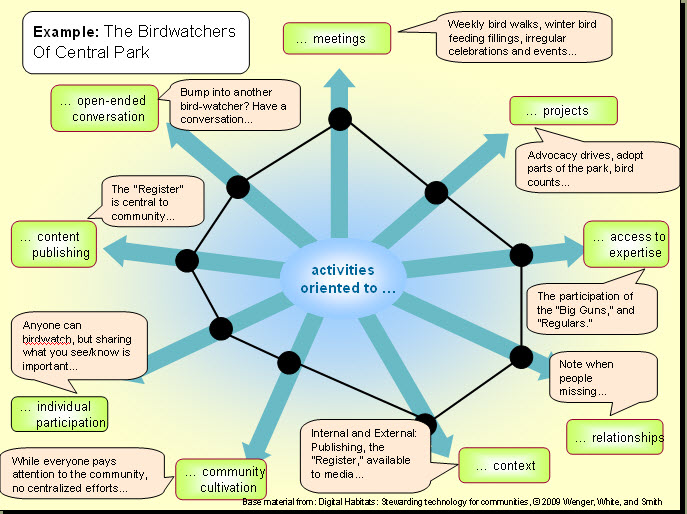
I thought it might be fun to look at this community, as best an outsider can do (which is usually not very well) from one of the CoP perspectives Etienne Wenger, John Smith and I use in our upcoming book, Digital Habitats: stewarding technology for community. This work builds on what Etienne has been doing for years. In our research of CoPs we noticed 9 general patterns of activities that characterized a community’s orientation. Most had a mix, but some were more prominent in every case. By looking at orientations, we posit, you are in a better position to understand how to support them with tools and processes. They give you a lens to reflect on how your community is doing and where you might want it to be headed.

Here is a brief glimpse of the orientations:

  • Meetings – in person or online gatherings with an agenda (i.e. monthly topic calls)
  • Projects – interrelated tasks with specific outcomes or products (i.e. Identifying a new practice and refining it.)
  • Access to expertise – learning from experienced practitioners (i.e. access to subject matter experts)
  • Relationship – getting to know each other (i.e. the annual potluck dinner!)
  • Context – private, internally-focused or serving an organization, or the wider world (i.e. what is kept within the community, what is shared with the wider world)
  • Community cultivation – Recruiting, orienting and supporting members, growing the community (i.e. who made sure you’re the new person was invited in and met others?)
  • Individual participation – enabling members to craft their own experience of the community (i.e. access material when and how you want it.)
  • Content – a focus on capturing and publishing what the community learns and knows (i.e. a newsletter, publishing an article, etc.)
  • Open ended conversation – conversations that continue to rise and fall over time without a specific goal (i.e. listserv or web forum, Twitter, etc.)
Spidergram examples of the Central Park Birdwatchers

Spidergram examples of the Central Park Birdwatchers - click for larger image

We have been using a little “spidergram” as an assessment tool, again building on Etienne’s work, but each of us has been creative in how we use it. Sometimes it is for looking at technology choices (like in the Digital Habitats book), sometimes for community assessment and planning. So I decided to see what orientations were strong in the Central Park birdwatchers “Regulars” group chronicled in the book. Here is the image I came up with:

Would you like to try the Spidergram activity for your community? You can find a little cheat sheet and template here.

If you try it, I’d be interested to hear what you observed or learned about your community by doing this exercise.

And yes, the book is coming SOON!

Reblog this post [with Zemanta]

3 responses so far

« Prev - Next »